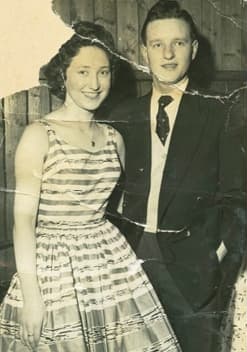
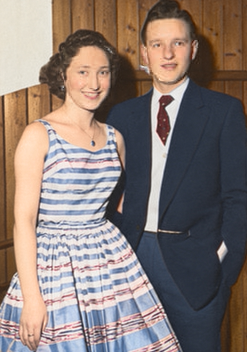
Scratched and creased prints
Small scratches, dust marks and creases often have enough surrounding detail for a useful repair. A cleaner digital copy helps; new scanner dust can look like original damage.
Help with scratches →The wedding portrait. A childhood summer. A face you know by heart. Scan or photograph the print, and AI repairs scratches, creases, stains and fading in about a minute while the faces stay as they are.
2 free credits each month · Verified account · No ads or watermarks
Drop an old photograph here, or take a picture of the print.
JPG, PNG, WebP or HEIC · up to 10 MB each · up to 10 photos
One credit per edit. Downloads are free.
Small scratches, dust marks and creases often have enough surrounding detail for a useful repair. A cleaner digital copy helps; new scanner dust can look like original damage.
Help with scratches →Better contrast can make a faded scene easier to read. Lost detail cannot be recovered with certainty, and a sharp invented face is not a reliable record of a person.
Help with fading →Stains and torn edges can improve, but large missing areas leave little evidence. For a unique or historically important photograph, consider a skilled human restorer.
Help with water damage →The age of a photograph matters less than its condition and the quality of the scan, but each era tends to fail in its own way.
Tintypes, cabinet cards, albumen prints. Silver mirroring, yellowed highlights, cracked mounts and very low contrast.
Contrast and stains usually improve. Scan in color, avoid glare on metal plates, and expect faces this small to stay soft.
Black-and-white gelatin silver prints. Fading, foxing spots, creases from albums and wallets, torn corners.
These often restore well. Colorize afterwards as a second version if you want one.
Black-and-white snapshots, early color prints. Early color dyes shift toward magenta or cyan; deckle-edged snapshots crease.
Color casts and scratches respond well. Very small snapshots need a 600 DPI scan.
Color drugstore prints and Polaroids. Orange or red shift, faded shadows, sticky album pages, matte-paper texture.
Color balance and contrast come back; heavy paper texture can read as noise.
Restore the damage first, then add color as a separate version. Color is a plausible interpretation, not a record of what people wore.
Colorize an old photo →Old lenses and slow film often left faces soft. Restoration keeps that softness rather than inventing a sharper stranger.
What blur removal can do →Keep the camera parallel to the print and use soft light. Save the original scan separately. Working copies are resized to a maximum long edge of 2048 pixels before restoration.
Cover the face, ears and hairline with protected areas. Those pixels stay unchanged in the working image. Scratches or blur inside the areas stay too; switch protection off only if you accept possible changes.
Look closely at eyes, expressions, clothing and other important details. Save the PNG within 24 hours. On supported devices, share the photo file directly with family.
Yes. A verified PhotoRestore account receives 2 free credits each calendar month. Each restoration or other AI tool uses one credit. Downloads have no watermark. Plus and Archive subscriptions provide more monthly credits.
Mark every face with face protection before restoring. Those areas keep the exact pixels of your prepared working image, including any blur, grain or damage. Unprotected areas can change. AI cannot know what an unreadable or missing face originally looked like.
You can try scans of photographs from any era. The condition and quality of the scan matter more than its age. Reflective plates, fragile prints and historically valuable originals may need help from a professional conservator before scanning.
It can reduce scratches, creases, dust, staining and fading. Results depend on the visible information. Large tears and missing sections may produce invented detail. Damage inside protected face areas remains unchanged.
Many edits take 30–90 seconds, but some take longer. Once uploaded, the photo continues processing if you leave. You can find the result in your account.
A clear scan is a good starting point. Keep a high-resolution archival master and upload a working copy. If you use a phone, keep it parallel to the print in soft, even light and avoid flash glare. Do not force fragile or stuck photographs apart.
Your working photos are private to your account and available for 24 hours. A scheduled cleanup removes expired files, normally within another 15 minutes. Runware processes the edit and may retain temporary copies for up to 7 days. Download a copy you want to keep.
It cannot read detail that is no longer in the print. A face lost to fading, a name washed off the back, or a missing corner is redrawn as a plausible guess. Treat the result as a restored copy, keep the original scan, and use a professional restorer when historical accuracy matters.
Yes. Add up to 10 photos at once in the studio and they are restored one after another, each using one credit. Download the finished photos together as a ZIP file. The Archive plan includes 120 photos a month for larger collections.
Yes. Colorization and 2× upscaling are separate edits, each using one credit. Color is an interpretation rather than historical evidence. Keep the unedited scan and compare important facial details after every edit.
A restored image is an edited interpretation, not a replacement for your family archive. Keep the unedited scan, label restored versions clearly, and make backups of the photographs you cannot replace.