Photo restore iconPhotoRestore.io

Old Photo Restoration

Restore Vintage, Antique & Damaged Photos Online Free

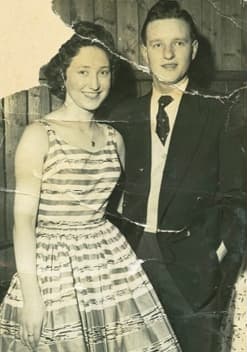
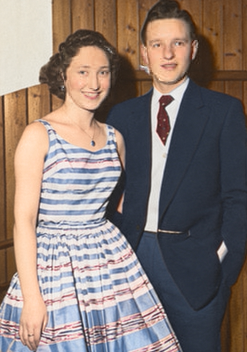
Restore old photos in seconds with AI-powered photo restoration. Our free tool repairs fading, scratches, tears, water damage, discoloration, and age-related wear - transforming damaged old photographs into clear, vibrant images. No signup required, works on any device.

Trusted by over 10 million users. Works with photos from any era - 1840s daguerreotypes to modern prints.

Restore Your Old Photo Now

Upload once, then switch between restoration, enhancement, color, upscale, and background tools.

Preserve Your Family History with AI Photo Restoration

Old photographs are irreplaceable windows into our past. Whether it's a portrait of a great-grandparent, a vintage wedding photo, or a historical snapshot, these images connect us to our heritage and tell the stories of those who came before us. Every crease, every faded face, every yellowed edge represents a moment in time that deserves to be preserved for future generations.

Time, however, is not kind to photographs. The chemical processes that capture light on paper inevitably break down. Fading begins within decades of printing. Physical handling introduces scratches and tears. Humidity causes foxing and mold. Water damage can occur in an instant but leave permanent marks. What was once a clear window into the past becomes obscured by the ravages of time.

Our AI-powered restoration technology can reverse much of this damage. Trained on millions of photographs spanning over 150 years of photographic history, our AI understands how different types of damage affect images and knows how to repair them while preserving the authentic character of the original photograph. Unlike general photo restoration, our old photo restoration tool is specifically optimized for the unique challenges of vintage and antique photographs.

Whether you're working on a genealogy project, preparing photos for a family reunion, creating a memorial, or simply want to see your ancestors' faces clearly for the first time, PhotoRestore.io can help bring your vintage photographs back to life. After restoration, you can also colorize black-and-white photos or upscale the image resolution for large prints.

How to Restore Old Photos Online

1

Scan Your Old Photo

Create a digital copy of your old photograph. Scan at 300 DPI or higher for best results. If you don't have a scanner, a clear smartphone photo in good lighting works too. Handle fragile photos with care - consider using cotton gloves.

2

AI Photo Restoration

Upload your image and our AI goes to work. It analyzes the type and extent of damage, identifies faces and important details, and applies intelligent restoration techniques. The AI repairs fading, removes scratches, corrects color casts, and reconstructs damaged areas - all in seconds.

3

Download & Preserve

Download your restored photo in high quality. Print it, frame it, share it with family, or add it to your digital archive. Follow up with photo colorization to add realistic color, or enhance image quality for even sharper results.

AI Photo Restoration vs. Professional Manual Restoration

See how AI-powered old photo restoration compares to hiring a professional photo restorer.

FeatureAI Restoration (PhotoRestore.io)Professional Manual Restoration
CostFree$50 - $500+ per photo
Speed10-30 seconds1-7 days
Batch ProcessingUnlimited photos at onceOne photo at a time
ConsistencyConsistent, repeatable resultsVaries by restorer skill
Availability24/7, any device, anywhereBusiness hours, location-dependent
Common DamageExcellent resultsExcellent results
Extreme DamageGood results, some limitationsMay achieve better results

For most old photos, AI restoration delivers professional-quality results instantly and at no cost.

Types of Old Photo Damage We Repair

Our AI is trained to recognize and fix many types of damage that affect vintage and antique photographs. Whether your photos are faded, torn, water-damaged, or yellowed, our restoration tool can help.

Fading & Discoloration

Over time, photo chemicals break down and colors fade. Our AI restores the original tones and brings back detail lost to decades of gradual fading.

Yellowing & Color Shift

Aging photos often develop yellow or sepia color casts. Our AI corrects these color shifts and restores the original tones of the image.

Scratches & Scuffs

Handling photos over the years leaves scratches and scuffs on the surface. Our AI detects these marks and fills them in using surrounding image data for a seamless repair.

Water Damage & Stains

Water exposure causes warping, discoloration, and staining. Our AI removes water marks and stains, and restores clarity to areas blurred or distorted by moisture damage.

Tears & Missing Pieces

Torn photos and missing corners are common in old prints. Our AI reconstructs damaged edges and fills in missing sections using context from the surrounding image.

Foxing & Brown Spots

Foxing appears as brown spots caused by fungal growth on aging photo paper. Our AI removes these blemishes while preserving the image detail underneath.

Mold & Mildew Damage

Mold and mildew from humid storage conditions break down photo emulsions over time. Our AI cleans affected areas and restores image detail hidden beneath the surface damage.

Creases & Fold Lines

Fold lines and creases leave permanent marks on printed photos. Our AI detects and smooths these lines, dramatically reducing their visibility in the restored image.

How AI Photo Restoration Technology Works

AI photo restoration uses deep learning neural networks trained on millions of photograph pairs - damaged originals alongside their professionally restored counterparts. Through this training, the AI learns to recognize patterns of damage and understand what undamaged photos should look like.

When you upload an old photo, the AI performs several operations simultaneously. First, it classifies the types of damage present: scratches, fading, tears, discoloration, water stains, foxing, or physical creasing. Next, it identifies important image elements - faces, text, fine details - that require particularly careful treatment. Finally, it generates repaired pixels that match the surrounding context, effectively reconstructing what the original photograph looked like before damage occurred.

Face restoration is handled by a specialized model that understands human facial anatomy. This allows the AI to reconstruct facial features that have been obscured by fading or damage with remarkable accuracy. Eyes, noses, mouths, and skin textures are enhanced while maintaining the natural appearance and identity of the person in the photo.

Color correction uses a separate analysis pipeline. The AI detects unwanted color casts - the yellow tint from aging paper, the magenta shift from deteriorating color dyes, the blue cast from certain storage conditions - and corrects them to restore natural tones. For black-and-white photos, it adjusts contrast and tonal range to bring out detail that has been lost to fading.

The entire process completes in 10-30 seconds, compared to the hours or days required for manual restoration by a professional. And because the AI applies consistent, trained models, the results are reliable and repeatable across any number of photos. You can process an entire collection of family photos in an afternoon, something that would take a professional restorer weeks.

When to Use Old Photo Restoration

People restore old photos for many reasons. Here are the most common use cases our users bring to PhotoRestore.io.

Family Genealogy Projects

Restore photos of ancestors for family trees, heritage websites, and genealogy research. Clear, restored portraits help connect generations and preserve your family lineage.

Memorial & Funeral Displays

Create clear, high-quality prints of loved ones for memorial services, celebration of life events, and tribute displays. Restore faded or damaged photos to honor their memory.

Wedding Anniversaries

Surprise parents or grandparents by restoring their original wedding photos. A beautifully restored wedding portrait makes a meaningful anniversary gift.

Family Reunions

Prepare a collection of restored family photos for slideshow presentations, printed displays, or photo books to share at family gatherings.

Historical Documentation

Restore photos for local history projects, museum exhibits, school reports, and documentary research. AI restoration reveals details lost to decades of deterioration.

Digital Photo Archives

Digitize and restore entire boxes of old family photos. Build a searchable digital archive that preserves your family history and can be easily shared with relatives.

Old Photo Restoration by Era

Different photographic eras have different characteristics and common issues. Our AI understands these nuances and applies era-appropriate restoration techniques.

1840s-1860s: Daguerreotypes & Ambrotypes

These early photographs were captured on metal or glass plates and often have a mirror-like reflective quality. Their unique surface properties require careful handling during scanning. Our AI is trained to recognize these early photographic processes and restore fine details without over-smoothing the distinctive texture of the original.

Tip:Scan at 600+ DPI for best results with these delicate prints. The fine detail in daguerreotypes and ambrotypes benefits greatly from high-resolution scanning.

1860s-1900s: Tintypes & Cabinet Cards

Tintypes were durable metal prints popular during the Civil War, often carried by soldiers. Cabinet cards were larger prints mounted on cardboard, typically taken in portrait studios. Both formats may show silver mirroring where the metallic coating has deteriorated over time.

Tip:Watch for silver mirroring (a shiny, metallic sheen), which indicates chemical deterioration. Our AI can correct for this common issue in metal-based prints.

1900s-1940s: Black & White Prints

Most photos from this era used gelatin silver prints, which tend to yellow and fade over time. These prints were the standard for family portraits, personal snapshots, and documentary photography. Print longevity varied significantly based on original processing quality.

Tip:These prints respond very well to restoration. Consider following up with colorization to bring a new dimension to your restored black-and-white images.

1940s-1970s: Mid-Century Photography

Post-war improvements in film and paper quality made photography more accessible and reliable. However, many prints from this era still show significant fading, especially early color photographs, which are particularly prone to color degradation over time.

Tip:Color photos from this period often develop magenta or cyan color casts as dyes break down. Our AI accurately corrects these color imbalances during restoration.

1970s-1990s: Color Print Era

Consumer photography became widespread during this era. Despite being more recent, these prints still suffer from color fading, chemical breakdown, and physical damage from regular handling over the decades.

Tip:Even photos from the 1980s and 1990s can benefit from restoration. Color prints start to fade noticeably after just 20-30 years.

How to Scan Old Photos for Best Restoration Results

The quality of your restoration depends on the quality of your scan or photograph. Follow these tips to get the best possible results when digitizing old photographs for AI restoration.

Use the Right Resolution

Scan at 300 DPI minimum for standard prints. For small photos or images that need significant restoration, use 600 DPI or higher. Higher resolution gives the AI more detail to work with.

Clean Your Scanner Glass

Dust and smudges on the scanner glass will appear in every scan. Wipe the glass with a soft microfiber cloth before scanning to avoid introducing new artifacts into your image.

Handle Photos with Care

Wear cotton gloves when handling old photographs to prevent oils from your skin from causing further damage. Support fragile prints with a piece of stiff cardboard when moving them.

Scan in Color Mode

Even for black-and-white photos, scan in color mode. This captures more tonal information and lets the AI detect and correct color casts like yellowing. You can always convert to grayscale afterward.

Don't Over-Compress

Save scans as TIFF or high-quality JPG (90% quality or above). Heavy compression destroys fine detail that the AI needs for accurate restoration. Storage is cheap - always prioritize image quality.

Photograph if You Can't Scan

If you don't have a scanner, photograph the print in even, diffused lighting. Keep the camera parallel to the photo surface, avoid using flash, and minimize glare and reflections.

Getting the Best Results from Old Photo Restoration

While our AI handles restoration automatically, you can improve results by following a recommended workflow. Start with the highest quality scan or photograph you can produce. More pixels give the AI more data to work with, leading to sharper, more detailed restorations.

Restoration first, then enhancements. Always restore your old photo before applying other tools. Restoration removes damage and corrects fundamental issues. Once the photo is restored, you can enhance the image quality to sharpen details, upscale the resolution for printing, or add color to black-and-white photos.

For heavily damaged photos, try running the restoration more than once. The second pass can sometimes pick up additional details or further reduce damage that the first pass improved but didn't fully resolve.

Blurry old photos benefit from a combined approach: restore first to fix damage, then use our blur removal tool to sharpen the image further. Many old photos were taken with slow shutter speeds or imperfect focus, and blur removal can reveal details the restoration alone may not fully resolve.

For printing restored photos, we recommend upscaling the image to at least 2x resolution after restoration. This ensures your print is sharp and detailed even at larger sizes. Old photos were often small prints, and upscaling ensures you can frame them at modern sizes without pixelation.

What Our Users Say About Old Photo Restoration

"We had a faded photo of my great-grandmother that was barely visible anymore. After restoring it, her face was so clear it felt like seeing her for the first time. Our whole family was moved to tears."

Sarah M. - Texas, USA

"The only photo of my grandfather in his military uniform was badly torn and water-damaged. PhotoRestore brought it back beautifully. It now hangs framed in our living room, looking clear and sharp."

Michael T. - London, UK

"I had over 200 old family photos that needed restoration and thought it would take forever. With PhotoRestore, I was able to process the entire collection in an afternoon. The results were incredible and it was completely free."

Patricia L. - Ontario, Canada

Complete Your Restoration with Related Photo Tools

After restoring your old photos, use these tools to further enhance, colorize, upscale, or edit your restored images.

Old Photo Restoration FAQ

Yes! Our AI can restore photos from any era, including daguerreotypes and faded 19th-century prints. It's trained on vintage images and repairs damage while preserving the authentic character of the original.

Ready to Restore Your Old Photos?

Give your vintage and antique photographs new life. Upload your old photo above and watch AI restore it in seconds. Free, instant, no signup required. Preserve your precious family memories for future generations.

Restore Your Old Photo Now