
Restore Old Photos Online Free
Old photo restoration and picture repair for family prints
Restore old photos in seconds with AI-powered picture restoration. Our free tool repairs fading, scratches, tears, water damage, discoloration, and age-related wear - transforming damaged family photographs into clearer digital images. No signup required, works on any device.
Works with photos from any era - 1840s daguerreotypes to modern prints.
Restore Your Old Photo Now
Upload once, then switch between restoration, enhancement, color, upscale, and background tools.
Restore old photos, pictures, and family prints
This page is for old photo restoration intent: fragile prints, vintage portraits, family archives, and damaged pictures that need repair before sharing or printing.
Restore old photos
Repair faded, scratched, torn, yellowed, and water-damaged family photos from any era.
Old picture restoration
Use a scan or phone photo of an old picture and create a cleaner digital version for archiving or printing.
Vintage photo repair
Restore antique portraits, wedding photos, school pictures, military portraits, and inherited prints.
Family photo preservation
Create restored copies for genealogy projects, memorial displays, family albums, and reunions.
Choose the Right Old Photo Repair Guide
Old Photo Repair
Best for cracked prints, scratches, stains, torn corners, and general damaged old pictures.
Restore Faded Photos
Best for washed-out faces, yellowed black-and-white prints, and old color photos with dye shifts.
Water Damaged Photo Restoration
Best for photos affected by water stains, humidity, mold marks, rippling, or flood damage.
Preserve Your Family History with AI Photo Restoration
Old photographs are irreplaceable windows into our past. Whether it's a portrait of a great-grandparent, a vintage wedding photo, or a historical snapshot, these images connect us to our heritage and tell the stories of those who came before us. Every crease, every faded face, every yellowed edge represents a moment in time that deserves to be preserved for future generations.
Time, however, is not kind to photographs. The chemical processes that capture light on paper inevitably break down. Fading begins within decades of printing. Physical handling introduces scratches and tears. Humidity causes foxing and mold. Water damage can occur in an instant but leave permanent marks. What was once a clear window into the past becomes obscured by the ravages of time.
Our AI-powered restoration technology can reverse much of this damage. Trained on millions of photographs spanning over 150 years of photographic history, our AI understands how different types of damage affect images and knows how to repair them while preserving the authentic character of the original photograph. Unlike general photo restoration, our old photo restoration tool is specifically optimized for the unique challenges of vintage and antique photographs.
Whether you're working on a genealogy project, preparing photos for a family reunion, creating a memorial, or simply want to see your ancestors' faces clearly for the first time, PhotoRestore.io can help bring your vintage photographs back to life. After restoration, you can also colorize black-and-white photos or upscale the image resolution for large prints.
How to Restore Old Photos Online
Scan Your Old Photo
Create a digital copy of your old photograph. Scan at 300 DPI or higher for best results. If you don't have a scanner, a clear smartphone photo in good lighting works too. Handle fragile photos with care - consider using cotton gloves.
AI Photo Restoration
Upload your image and our AI goes to work. It analyzes the type and extent of damage, identifies faces and important details, and applies intelligent restoration techniques. The AI repairs fading, removes scratches, corrects color casts, and reconstructs damaged areas - all in seconds.
Download & Preserve
Download your restored photo in high quality. Print it, frame it, share it with family, or add it to your digital archive. Follow up with photo colorization to add realistic color, or enhance image quality for even sharper results.
AI Photo Restoration vs. Professional Manual Restoration
See how AI-powered old photo restoration compares to hiring a professional photo restorer.
| Feature | AI Restoration (PhotoRestore.io) | Professional Manual Restoration |
|---|---|---|
| Cost | Free | $50 - $500+ per photo |
| Speed | 10-30 seconds | 1-7 days |
| Batch Processing | Unlimited photos at once | One photo at a time |
| Consistency | Consistent, repeatable results | Varies by restorer skill |
| Availability | 24/7, any device, anywhere | Business hours, location-dependent |
| Common Damage | Excellent results | Excellent results |
| Extreme Damage | Good results, some limitations | May achieve better results |
For most old photos, AI restoration delivers professional-quality results instantly and at no cost.
Types of Old Photo Damage We Repair
Our AI is trained to recognize and fix many types of damage that affect vintage and antique photographs. Whether your photos are faded, torn, water-damaged, or yellowed, our restoration tool can help.
Fading & Discoloration
Over time, photo chemicals break down and colors fade. Our AI restores the original tones and brings back detail lost to decades of gradual fading.
Yellowing & Color Shift
Aging photos often develop yellow or sepia color casts. Our AI corrects these color shifts and restores the original tones of the image.
Scratches & Scuffs
Handling photos over the years leaves scratches and scuffs on the surface. Our AI detects these marks and fills them in using surrounding image data for a seamless repair.
Water Damage & Stains
Water exposure causes warping, discoloration, and staining. Our AI removes water marks and stains, and restores clarity to areas blurred or distorted by moisture damage.
Tears & Missing Pieces
Torn photos and missing corners are common in old prints. Our AI reconstructs damaged edges and fills in missing sections using context from the surrounding image.
Foxing & Brown Spots
Foxing appears as brown spots caused by fungal growth on aging photo paper. Our AI removes these blemishes while preserving the image detail underneath.
Mold & Mildew Damage
Mold and mildew from humid storage conditions break down photo emulsions over time. Our AI cleans affected areas and restores image detail hidden beneath the surface damage.
Creases & Fold Lines
Fold lines and creases leave permanent marks on printed photos. Our AI detects and smooths these lines, dramatically reducing their visibility in the restored image.
How AI Photo Restoration Technology Works
AI photo restoration uses deep learning neural networks trained on millions of photograph pairs - damaged originals alongside their professionally restored counterparts. Through this training, the AI learns to recognize patterns of damage and understand what undamaged photos should look like.
When you upload an old photo, the AI performs several operations simultaneously. First, it classifies the types of damage present: scratches, fading, tears, discoloration, water stains, foxing, or physical creasing. Next, it identifies important image elements - faces, text, fine details - that require particularly careful treatment. Finally, it generates repaired pixels that match the surrounding context, effectively reconstructing what the original photograph looked like before damage occurred.
Face restoration is handled by a specialized model that understands human facial anatomy. This allows the AI to reconstruct facial features that have been obscured by fading or damage with remarkable accuracy. Eyes, noses, mouths, and skin textures are enhanced while maintaining the natural appearance and identity of the person in the photo.
Color correction uses a separate analysis pipeline. The AI detects unwanted color casts - the yellow tint from aging paper, the magenta shift from deteriorating color dyes, the blue cast from certain storage conditions - and corrects them to restore natural tones. For black-and-white photos, it adjusts contrast and tonal range to bring out detail that has been lost to fading.
The entire process completes in 10-30 seconds, compared to the hours or days required for manual restoration by a professional. And because the AI applies consistent, trained models, the results are reliable and repeatable across any number of photos. You can process an entire collection of family photos in an afternoon, something that would take a professional restorer weeks.
When to Use Old Photo Restoration
People restore old photos for many reasons. Here are the most common use cases our users bring to PhotoRestore.io.
Family Genealogy Projects
Restore photos of ancestors for family trees, heritage websites, and genealogy research. Clear, restored portraits help connect generations and preserve your family lineage.
Memorial & Funeral Displays
Create clear, high-quality prints of loved ones for memorial services, celebration of life events, and tribute displays. Restore faded or damaged photos to honor their memory.
Wedding Anniversaries
Surprise parents or grandparents by restoring their original wedding photos. A beautifully restored wedding portrait makes a meaningful anniversary gift.
Family Reunions
Prepare a collection of restored family photos for slideshow presentations, printed displays, or photo books to share at family gatherings.
Historical Documentation
Restore photos for local history projects, museum exhibits, school reports, and documentary research. AI restoration reveals details lost to decades of deterioration.
Digital Photo Archives
Digitize and restore entire boxes of old family photos. Build a searchable digital archive that preserves your family history and can be easily shared with relatives.
Old Photo Restoration by Era
Different photographic eras have different characteristics and common issues. Our AI understands these nuances and applies era-appropriate restoration techniques.
1840s-1860s: Daguerreotypes & Ambrotypes
These early photographs were captured on metal or glass plates and often have a mirror-like reflective quality. Their unique surface properties require careful handling during scanning. Our AI is trained to recognize these early photographic processes and restore fine details without over-smoothing the distinctive texture of the original.
1860s-1900s: Tintypes & Cabinet Cards
Tintypes were durable metal prints popular during the Civil War, often carried by soldiers. Cabinet cards were larger prints mounted on cardboard, typically taken in portrait studios. Both formats may show silver mirroring where the metallic coating has deteriorated over time.
1900s-1940s: Black & White Prints
Most photos from this era used gelatin silver prints, which tend to yellow and fade over time. These prints were the standard for family portraits, personal snapshots, and documentary photography. Print longevity varied significantly based on original processing quality.
1940s-1970s: Mid-Century Photography
Post-war improvements in film and paper quality made photography more accessible and reliable. However, many prints from this era still show significant fading, especially early color photographs, which are particularly prone to color degradation over time.
1970s-1990s: Color Print Era
Consumer photography became widespread during this era. Despite being more recent, these prints still suffer from color fading, chemical breakdown, and physical damage from regular handling over the decades.
How to Scan Old Photos for Best Restoration Results
The quality of your restoration depends on the quality of your scan or photograph. Follow these tips to get the best possible results when digitizing old photographs for AI restoration.
Use the Right Resolution
Scan at 300 DPI minimum for standard prints. For small photos or images that need significant restoration, use 600 DPI or higher. Higher resolution gives the AI more detail to work with.
Clean Your Scanner Glass
Dust and smudges on the scanner glass will appear in every scan. Wipe the glass with a soft microfiber cloth before scanning to avoid introducing new artifacts into your image.
Handle Photos with Care
Wear cotton gloves when handling old photographs to prevent oils from your skin from causing further damage. Support fragile prints with a piece of stiff cardboard when moving them.
Scan in Color Mode
Even for black-and-white photos, scan in color mode. This captures more tonal information and lets the AI detect and correct color casts like yellowing. You can always convert to grayscale afterward.
Don't Over-Compress
Save scans as TIFF or high-quality JPG (90% quality or above). Heavy compression destroys fine detail that the AI needs for accurate restoration. Storage is cheap - always prioritize image quality.
Photograph if You Can't Scan
If you don't have a scanner, photograph the print in even, diffused lighting. Keep the camera parallel to the photo surface, avoid using flash, and minimize glare and reflections.
Getting the Best Results from Old Photo Restoration
While our AI handles restoration automatically, you can improve results by following a recommended workflow. Start with the highest quality scan or photograph you can produce. More pixels give the AI more data to work with, leading to sharper, more detailed restorations.
Restoration first, then enhancements. Always restore your old photo before applying other tools. Restoration removes damage and corrects fundamental issues. Once the photo is restored, you can enhance the image quality to sharpen details, upscale the resolution for printing, or add color to black-and-white photos.
For heavily damaged photos, try running the restoration more than once. The second pass can sometimes pick up additional details or further reduce damage that the first pass improved but didn't fully resolve.
Blurry old photos benefit from a combined approach: restore first to fix damage, then use our blur removal tool to sharpen the image further. Many old photos were taken with slow shutter speeds or imperfect focus, and blur removal can reveal details the restoration alone may not fully resolve.
For printing restored photos, we recommend upscaling the image to at least 2x resolution after restoration. This ensures your print is sharp and detailed even at larger sizes. Old photos were often small prints, and upscaling ensures you can frame them at modern sizes without pixelation.
What Our Users Say About Old Photo Restoration
"We had a faded photo of my great-grandmother that was barely visible anymore. After restoring it, her face was so clear it felt like seeing her for the first time. Our whole family was moved to tears."
"The only photo of my grandfather in his military uniform was badly torn and water-damaged. PhotoRestore brought it back beautifully. It now hangs framed in our living room, looking clear and sharp."
"I had over 200 old family photos that needed restoration and thought it would take forever. With PhotoRestore, I was able to process the entire collection in an afternoon. The results were incredible and it was completely free."
Complete Your Restoration with Related Photo Tools
After restoring your old photos, use these tools to further enhance, colorize, upscale, or edit your restored images.
Old Photo Repair
Repair cracked, scratched, stained, and damaged old pictures with AI.
Try it free →Restore Faded Photos
Recover contrast and detail from faded, yellowed, or washed-out family photos.
Try it free →Water Damaged Photo Restoration
Reduce water stains, discoloration, mold marks, and moisture damage.
Try it free →Photo Colorization
Add realistic color to your restored black-and-white photos using AI-powered colorization. Perfect follow-up after restoration.
Try it free →Photo Restoration
General-purpose AI photo restoration for any damaged or degraded image, not just vintage photos.
Try it free →Image Quality Enhancer
Sharpen and clarify restored photos further. Remove noise and improve overall image quality.
Try it free →Image Upscaler
Increase the resolution of your restored old photos for large prints and framing without losing quality.
Try it free →Photo Blur Remover
Remove blur from old photos taken with slow shutter speeds or shaky hands. Sharpen faces and details.
Try it free →Background Remover
Remove or replace backgrounds in restored photos. Isolate subjects for clean portraits and composites.
Try it free →See the difference AI restoration makes
Drag the slider to compare the original scan with the restored result. The original always stays one drag away.
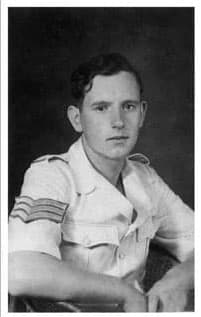 After
After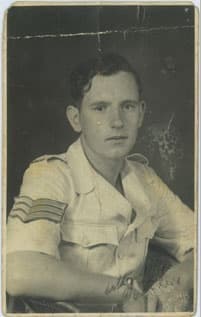 Before
Faded, scratched military portrait restored with AI
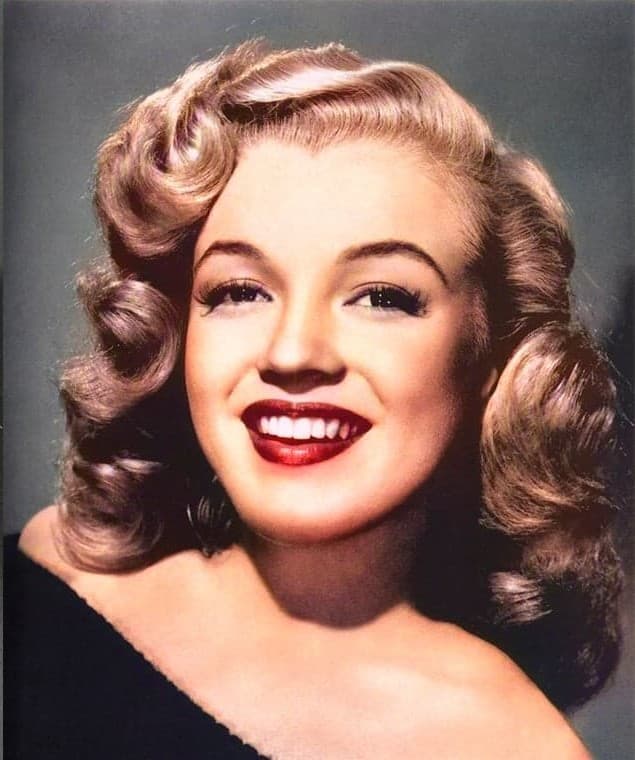 After
After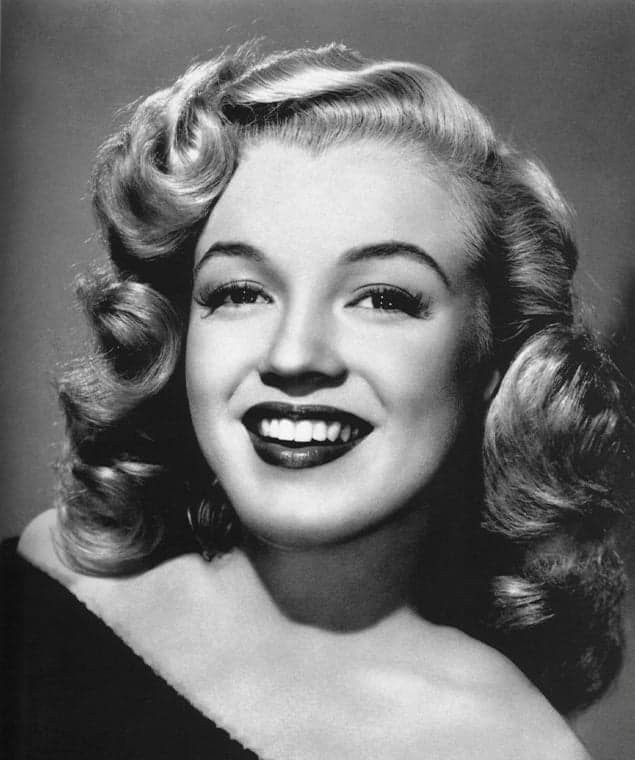 Before
Black and white vintage portrait colorized with AI
Drag anywhere on the image to compare before and after
Old Photo Restoration FAQ
Can you restore very old photos from the 1800s?
Yes! Our AI can restore photos from any era, including daguerreotypes and faded 19th-century prints. It's trained on vintage images and repairs damage while preserving the authentic character of the original.
What types of damage can be repaired on old photos?
Our AI handles a wide range of damage: fading, discoloration, scratches, tears, water damage, mold, foxing (brown spots), missing corners, and creases. Each type of damage is addressed with specialized restoration techniques tailored to the specific issue.
Will restoration change the vintage look of my photo?
No. Our AI restores clarity and repairs damage while preserving the original character of your photo. It won't add modern filters or artificial sharpness - instead, it removes scratches, fading, and other damage so the authentic vintage feel comes through clearly.
Can you restore photos of ancestors I've never seen clearly?
Absolutely! Our AI can reveal facial details hidden by fading, blur, or damage. Many users are amazed to see their ancestors' features clearly for the first time. The restoration enhances sharpness and contrast to bring out details that have been lost over the decades.
Should I scan my old photos first?
Yes, scanning at 300 DPI or higher gives our AI more detail to work with, resulting in a better restoration. Handle fragile photos carefully to avoid further damage. If you don't have a scanner, a clear smartphone photo in good lighting also works well.
How long does old photo restoration take?
Restoration is fast. Once you upload your photo, the AI typically completes the restoration in 10 to 30 seconds, depending on the image size and extent of damage.
Is the old photo restoration free?
Yes! PhotoRestore.io offers free old photo restoration with unlimited use. Simply upload your photo, and download the restored version when it's ready. No account or signup is required.
Can you restore severely damaged photos?
Yes, our AI can restore severely damaged photos, though results depend on how much of the original image remains. The more visual information that's intact, the better the restoration. Photos with large missing areas may have limited results in those sections.
What file formats do you support for old photos?
We support JPG, PNG, WEBP, HEIC, BMP, and TIFF formats. You can upload scanned images, smartphone photos of prints, or any existing digital files.
Can I restore photos that have been folded or creased?
Yes. Our AI detects fold lines and creases and significantly reduces their appearance. Deep creases that have cracked the photo surface can be minimized, though very severe physical damage may still be partially visible.
Will you store my family photos?
Your privacy is protected. Photos are automatically deleted from our servers after processing. Both the original and restored versions are removed once you've downloaded your result.
Can I also colorize my restored old photo?
Yes! After restoring your photo, you can use our colorization tool to add realistic color to black-and-white images. Many users restore first, then colorize for the best results.
How does AI photo restoration work?
AI photo restoration uses deep learning models trained on millions of photograph pairs - damaged originals alongside their professionally restored versions. When you upload a photo, the AI analyzes patterns of damage such as scratches, fading, tears, and discoloration. It then generates repaired pixels that match the surrounding image context, effectively reconstructing what the photo originally looked like. The process handles face enhancement, color correction, and texture reconstruction simultaneously.
Is AI restoration as good as professional manual restoration?
For most photos, AI restoration produces results comparable to professional manual work. AI excels at consistent, fast results for common damage like fading, scratches, and color correction. Professional restorers may still have an edge on extremely complex cases with large missing sections. However, AI restoration takes seconds instead of hours, costs nothing instead of $50-$200+ per photo, and handles batch processing of entire collections easily.
Can I fix old photos online without downloading software?
Yes. PhotoRestore.io runs entirely in your web browser. There's no software to download or install. Simply visit the site, upload your old photo, and download the restored version. It works on any device including phones, tablets, laptops, and desktop computers.
How do I repair old photographs that are stuck together?
Photos stuck together from humidity or water damage need careful physical separation before scanning. Try placing them in a sealed container with a damp (not wet) paper towel for 24 hours to gently loosen the bond. Never force stuck photos apart. If they won't separate, scan or photograph the front of the top photo and upload it for AI restoration. Our tool can repair much of the visible damage even from partially obscured images.
Can I restore photos on my phone?
Yes. PhotoRestore.io is fully mobile-friendly. You can take a photo of an old print directly with your phone camera and upload it for restoration. For best results, photograph the print in bright, even lighting without flash, keeping your phone parallel to the photo surface to avoid distortion.
What's the best way to preserve old photos after restoration?
After restoring your photos digitally, save the high-resolution files in multiple locations: cloud storage, an external hard drive, and your computer. For physical preservation, store original prints in acid-free photo boxes or albums, away from direct sunlight, heat, and humidity. Consider printing restored versions on archival-quality paper for display, keeping originals safely stored.
Can I restore old photos online for free?
Yes. Upload a scanned old photo or a clear phone picture of the print, then download the restored result after AI processing. No account, app installation, or manual editing is required.
Does this work for old picture restoration as well as photos?
Yes. People describe the same task as old photo restoration, old picture restoration, photo repair, and restoring family pictures. The tool works on scanned prints, photographed prints, and digital copies of old pictures.
What should I do before uploading a fragile family photo?
If the original is fragile, avoid bending, wiping, or flattening it by force. Scan it at 300 DPI or higher if possible, or take a straight, evenly lit phone photo. The better the digital copy, the better the AI restoration result.
Ready to Restore Your Old Photos?
Give your vintage and antique photographs new life. Upload your old photo above and watch AI restore it in seconds. Free, instant, no signup required. Preserve your precious family memories for future generations.
Restore Your Old Photo Now